If you manage 3-10 Meta ad accounts as a freelancer, most of your week isn't spent making strategic calls. It's spent on the same six routines, over and over, per account: pulling numbers, formatting a report, checking for broken UTMs, watching pacing, catching fatigued creative, and answering a client's "how's it going" message before they ask twice.
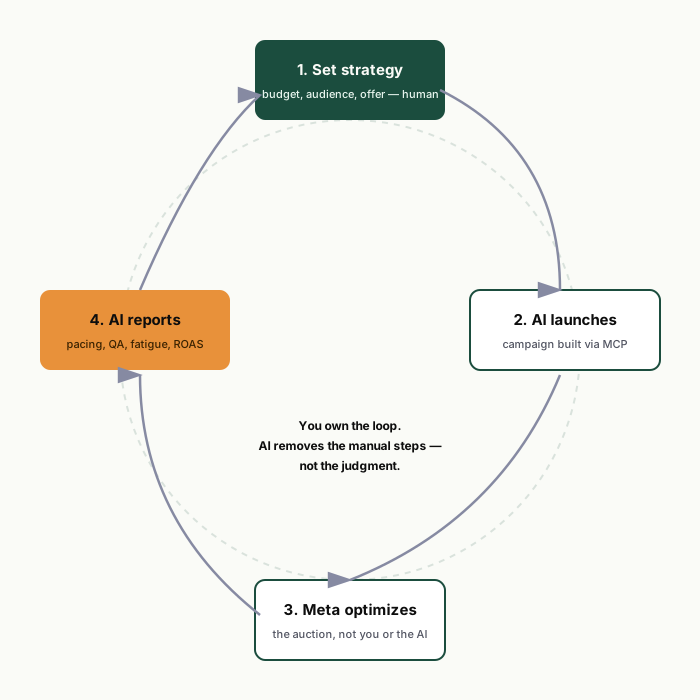
None of that work requires judgment you can't write down. That's exactly the kind of work the Meta Ads MCP is good at handing off — not because it "does media buying for you," but because it removes the manual labor around media buying so you spend your week on the 20% that actually needs a human. Below are the six workflows worth turning into repeatable prompts first, in the order we'd build them.
Why these six and not others
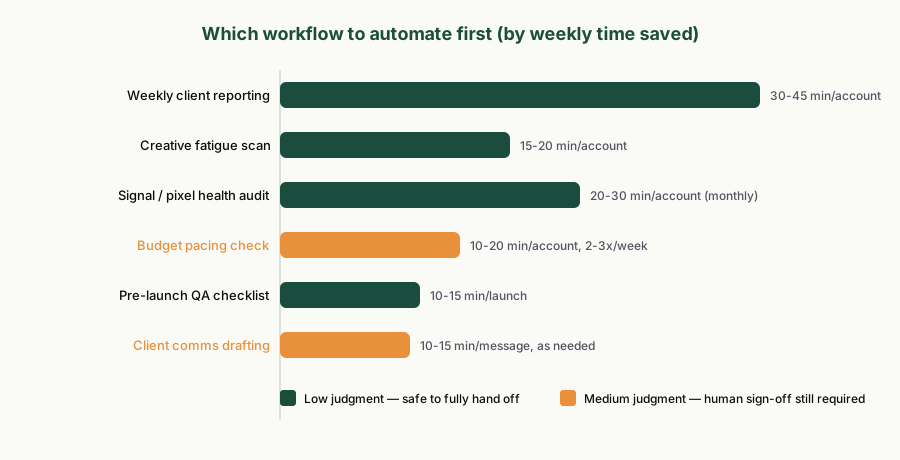
We built and ran 75 prompts across 8 categories before narrowing down to what freelancers actually run weekly versus what sits unused. The pattern: workflows that are read-only, recurring, and time-boxed (same questions, same cadence, different numbers each week) automate cleanly. Workflows requiring account-specific judgment — pricing strategy, seasonal budget shifts, brand voice in creative — don't, and shouldn't.
| Workflow | Cadence | Manual time saved | Judgment still required? |
|---|---|---|---|
| Weekly client reporting | Weekly | 30-45 min/account | Low — formatting + narrative only |
| Pre-launch QA | Per launch | 10-15 min/launch | Low — checklist is deterministic |
| Budget pacing check | 2-3x/week | 10-20 min/account | Medium — the fix still needs sign-off |
| Creative fatigue scan | Weekly | 15-20 min/account | Medium — which creative to swap in is your call |
| Signal / pixel health audit | Monthly + on anomaly | 20-30 min/account | Low — diagnostic, not strategic |
| Client comms drafting | As needed | 10-15 min/message | Medium — you still send it, in your voice |
1. Weekly client reporting, without the copy-paste
This is the single highest-leverage automation because every freelancer already does it, every week, for every client, and almost nobody enjoys it. The workflow: pull spend, ROAS, CTR, and conversions by campaign for the reporting window, then ask for a markdown table plus a 3-bullet executive summary written for a non-technical client.
The time saved isn't in the pull — Ads Manager already shows you the numbers. It's in the formatting, the client-facing language, and not having to remember which metrics this particular client cares about. Put those preferences in a project-level system prompt once, and every weekly report inherits them.
2. Pre-launch QA as a checklist, not a memory test
Naming convention drift, missing UTM parameters, duplicate audiences, unattached pixels — this is the checklist every experienced buyer runs mentally before hitting publish, and the one most likely to get skipped at 6pm on a Friday. Turning it into a standing prompt means it runs the same way every time, whether you're sharp or exhausted.
The output should flag issues by severity — policy risk, performance risk, cosmetic — not just list everything. A launch checklist that treats a missing UTM the same as a policy violation risk isn't actually useful under time pressure.
3. Pacing checks that catch drift before month-end panic
"Which campaigns are over- or under-pacing against this month's target?" turns a spreadsheet exercise into a 30-second answer, run 2-3 times a week instead of once in a panic on the 25th. The output flags the gap; you still decide whether to pull budget, extend the flight, or let it ride — that decision depends on context the account data doesn't contain.
4. Creative fatigue, ranked instead of eyeballed
Frequency creeping past 3.0 combined with declining CTR is the standard fatigue signal, and it's easy to miss when you're managing ten accounts instead of one. A weekly scan that ranks ad sets by frequency-and-CTR-decline gives you a prioritized "refresh these first" list instead of a gut check on which account "feels" tired.
5. Signal health, checked before it costs you a quarter
Pixel firing, CAPI event match quality, and attribution-window sanity checks are the audits everyone means to run monthly and nobody actually schedules. They're also exactly the kind of quiet failure that erodes reported ROAS for weeks before anyone notices — by which point the client is asking hard questions. Running this as a standing monthly prompt, plus triggering it any time conversion numbers look off, closes that gap.
6. Client comms drafted, not composed from scratch
"Draft a client-facing summary of this week's performance in plain language, no jargon, 4 sentences max" turns a 15-minute writing task into a 2-minute edit-and-send. You're still the one who reads it before it goes out and adjusts tone for that specific client relationship — but you're editing, not starting from a blank page.
What we deliberately left off this list
Budget reallocation decisions, audience strategy, and creative direction aren't on this list, and that's on purpose. Those require knowing the client's margin, seasonality, and brand constraints — none of which live in the ad account. We cover exactly where the line sits, with specifics, in our honest capability review of Claude + Meta Ads.
Want the full working versions of these prompts — plus 69 more across audit, reporting, QA, pacing, fatigue, audience, scaling, and client comms, along with 10 ready-to-paste Claude Project templates? That's what we built the Prompt Vault for.
Get the free Meta Ads MCP setup kit →
Related reading: Meta Ads MCP: the complete guide → and Claude + Meta Ads: an honest capability review →