On April 29, 2026, Meta quietly did something freelance media buyers had wanted for a decade: it opened a direct, officially-supported path for AI assistants to read and write Meta Ads accounts — without a Developer App, without Marketing API approval, and without a third-party SaaS tool sitting in the middle of your Business Manager.
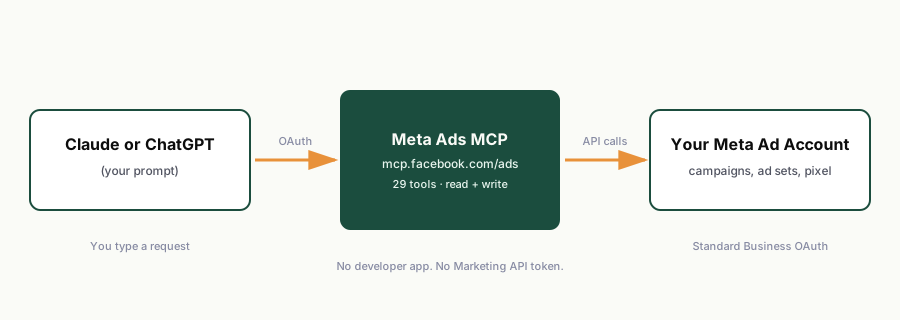
That path is called the Meta Ads MCP — a Model Context Protocol server hosted at mcp.facebook.com/ads. If you manage Meta ad accounts for clients or your own store and you've never heard of it, this guide covers what it actually is, what it can and can't do, and how to connect it to Claude or ChatGPT in about 10 minutes.
What is the Meta Ads MCP, in plain language?
MCP (Model Context Protocol) is an open standard — backed by Anthropic and adopted by OpenAI — that lets an AI assistant connect to external tools and data sources through a single, structured interface. Instead of every AI vendor building a custom integration with every ad platform, MCP gives Meta one server to maintain, and gives Claude, ChatGPT, and any other MCP-compatible assistant a consistent way to talk to it.
Meta's implementation exposes 29 tools across four groups:
| Tool group | What it covers | Example prompt |
|---|---|---|
| Performance reporting | Account, campaign, ad set, and ad-level insights with breakdowns | "Pull spend, ROAS, and CTR by campaign for the last 14 days." |
| Campaign management | Create/update campaigns, ad sets, ads — new entities launch paused by default | "Draft a new ad set targeting our warm audience at $50/day, paused." |
| Catalog management | Product catalogs, feed errors, item visibility | "Which products in my catalog are disapproved and why?" |
| Signal diagnostics | Pixel health, Conversions API setup, event match quality, anomalies | "Check pixel and CAPI event match quality for this account." |
Authentication runs through standard Meta Business OAuth — the same login flow you already use for Business Suite. There's no separate Marketing API token to generate, no app review to wait on, and no third-party platform holding a permanent connection to your ad account.
How to set it up (Claude, roughly 10 minutes)
- Open your AI assistant's connector settings. In Claude, this is under connectors/integrations for custom MCP servers.
- Add a custom connector and point it at the remote server URL:
https://mcp.facebook.com/ads. - Log in via Facebook Login when prompted — this is the standard OAuth screen you already know from Business Suite.
- Select the business portfolio(s) you want the assistant to have access to. You can scope this to a single ad account if you manage multiple clients and don't want cross-account visibility in one session.
- Test with a read-only prompt first — something like "list my active campaigns and their spend this week." Confirm the response matches what you see in Ads Manager before asking it to write anything.
The setup for ChatGPT follows the same shape: add the MCP server as a custom connector/action, authenticate via Facebook Login, and scope access to the accounts you want visible.
What it's genuinely good at
The honest use case for the Meta Ads MCP isn't "hand it your account and walk away." It's removing the repetitive, low-judgment work that eats a media buyer's week:
- Weekly client reporting. Spend, ROAS, CTR, and frequency by campaign, pulled and formatted in under two minutes instead of a manual export-and-format session.
- Pre-launch QA. Naming convention drift, missing UTM parameters, unattached pixels, and duplicate audiences — the checklist you'd run by hand before every launch, run as a prompt instead.
- Budget pacing checks. "Which campaigns are over- or under-pacing against this month's target?" turns a spreadsheet exercise into a 30-second answer.
- Creative fatigue flags. Frequency caps and CTR decay, ranked, so you know what needs a creative refresh before the client asks why performance dropped.
- Signal health audits. Pixel firing, CAPI event match quality, and attribution window sanity checks — the kind of diagnostic work that quietly breaks a quarter if nobody checks it.
Where it genuinely stops
This is the part most "AI will replace media buyers" content skips, and it matters if you're deciding whether to bring this into a client-facing workflow:
- Meta still owns the auction. The MCP can adjust budgets and structure — it does not out-optimize Meta's own delivery system. Nothing here changes how the ad auction works.
- No ROAS guarantee, ever. Any tool or guide that promises an AI connector will improve your return on ad spend is overselling. It executes instructions faster and more consistently. It doesn't replace strategy.
- New entities launch paused by default — a deliberate safety rail, but it means there's always a human review step before spend goes live, which is correct behavior, not a limitation to route around.
- It doesn't know your client's business. Margin, seasonality, inventory constraints, brand guidelines — none of that lives in the ad account. You're still the one translating business context into instructions.
- Read+write access means real risk if unsupervised. The MCP can pause campaigns, change budgets, and edit ad copy. Treat any write action the same way you'd treat handing a junior analyst production access — review before it touches live spend.
Is this the same as Zapier or Make automations?
No, and the difference is the entire reason this matters. Zapier and Make integrations for Meta Ads have historically hit the Marketing API wall — Meta's rate limits and approval requirements make third-party automation platforms brittle, and every schema change on Meta's side breaks the workflow until someone fixes the Zap. The MCP path bypasses that: it's a first-party server, authenticated directly, with no middleman platform to break.
It's also not the same as SaaS ad-automation tools like Revealbot or Madgicx, which typically run $200+/month per seat and require you to connect your Business Manager to a third-party platform. The MCP approach is a protocol, not a subscription product — you're paying for your AI assistant subscription (Claude or ChatGPT), not a recurring per-seat tool fee on top of it.
The realistic timeline for freelance buyers
Meta launched this in open beta on April 29, 2026, with no announced end date and no long-term pricing confirmed. Historically, when a major platform ships a capability like this in beta, two things happen on a predictable clock: agencies productize the workflow within 60-90 days, and the platform itself (or a competing AI vendor) ships a more polished native version within one to two quarters. That means the practical advantage of learning this now — rather than waiting for a "does it for you" product to appear — is measured in weeks, not months.
If you want the setup checklist and starter prompts without piecing it together from documentation, we put together a 12-step walkthrough plus 25 copy-paste prompts (audit, report, QA, pacing, fatigue) for exactly this workflow — the same one referenced above. It's free.
Get the free 12-step Meta Ads MCP checklist →
Related reading: AI media buying workflows for freelance buyers → and Claude + Meta Ads: an honest capability review →