Every "AI is coming for media buyers" post reads the same way: a list of things AI supposedly does now, no mention of where it breaks, and a call to action that oversells what's actually available. We'd rather tell you where the line is, because you're the one who has to answer for it when a client asks why their account looks a certain way.
This is a direct, specific rundown of what Claude can and can't do inside a live Meta ad account via the Meta Ads MCP connector — not a sales pitch dressed up as a review.
The test setup
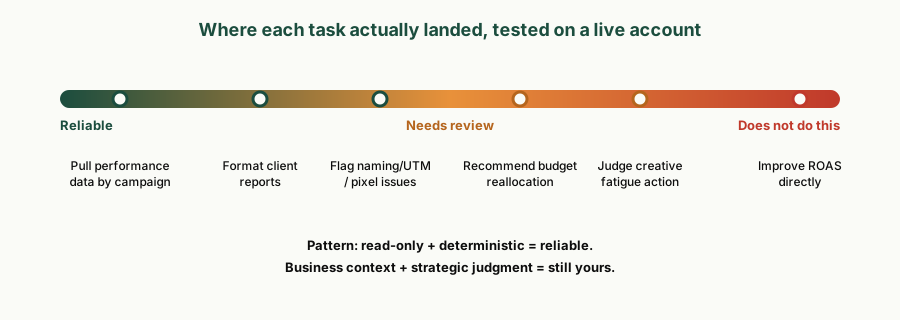
We connected Claude to a Meta ad account through the MCP server, ran it against the categories of work a freelance media buyer actually does in a given week — reporting, QA, pacing, audience and creative diagnostics — and logged what came back clean versus what needed a follow-up correction or human judgment call.
| Task category | Result | Notes |
|---|---|---|
| Pulling performance data (spend, ROAS, CTR, frequency) | Reliable | Matches Ads Manager numbers; formatting is the value-add, not the pull |
| Formatting a client-ready report | Reliable | Needs a house-style system prompt or output drifts toward generic phrasing |
| Flagging naming/UTM/pixel hygiene issues | Reliable | Deterministic checklist work — this is where it earns its keep |
| Recommending budget reallocation | Needs review | Suggests plausible moves; doesn't know client margin or seasonality |
| Judging "is this creative actually fatigued" | Needs review | Flags frequency/CTR patterns correctly; the swap decision is still yours |
| Improving ROAS directly | Does not do this | No tool changes how Meta's auction allocates delivery |
What it's genuinely reliable at
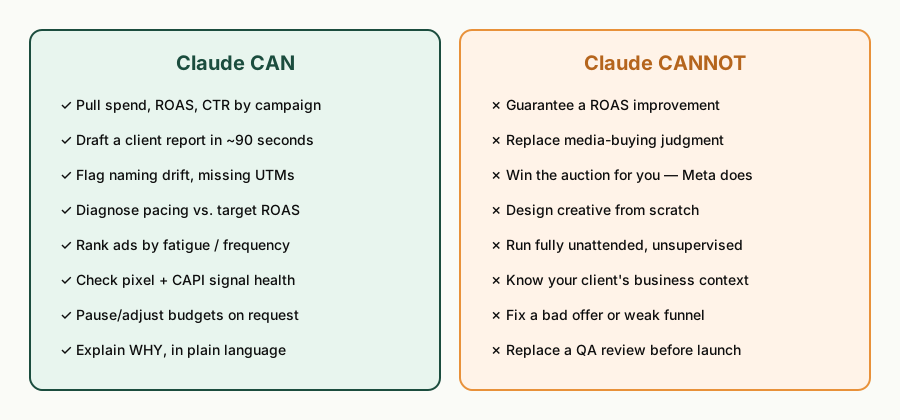
The pattern across every reliable result: read-only, deterministic, and checklist-shaped. Claude pulls the same data you'd pull manually, applies the same threshold logic you'd apply manually (frequency over 3.0, CTR under 0.8%, missing UTM parameters), and returns it faster and more consistently than a human doing it at 6pm after four other client calls.
- Data retrieval and formatting. Spend, ROAS, CTR, frequency, conversions — accurate, and it doesn't get tired of formatting the fifth report of the day the way you might.
- Rule-based QA. "Flag anything with frequency over X or CTR under Y" is exactly the kind of instruction Claude executes consistently, every time, across every account.
- Pattern flagging. Naming drift, missing tracking parameters, duplicate audiences — things with an objective right answer.
Where it needs a human in the loop
This is the part that matters most if you're deciding whether to put this in front of a client. Claude will confidently produce an answer to almost anything you ask — the question is whether that answer is grounded in something the ad account actually contains.
- Business context isn't in the data. Margin, inventory constraints, brand guidelines, what the client actually cares about this quarter — none of that lives in Ads Manager. Recommendations that depend on it are informed guesses, not facts.
- It doesn't out-optimize the auction. Meta's delivery system still decides who sees what, at what cost. Claude can restructure a campaign; it can't change how the auction clears.
- New entities launch paused, by design. Every write action needs a human review step before spend goes live. Treat that as correct behavior, not friction to script around.
- Creative judgment is still yours. It can tell you frequency is high and CTR is declining. Whether the fix is a new hook, a new format, or leaving it alone because the client has three more creatives in production — that's a call informed by things outside the account.
The claim we won't make
We won't tell you this improves ROAS, because it doesn't, and any tool that claims otherwise is selling you a story Meta's own auction mechanics don't support. What it does is remove the repetitive work around the account so you spend more of your week on the judgment calls that actually move outcomes — which is a real time saving, just not the same claim.
Where this leaves a freelance buyer
If you're managing 3-10 accounts solo, the honest opportunity here isn't "let AI run your accounts." It's cutting the hours spent on reporting, QA, and diagnostics — work that was never where your expertise added value in the first place — so more of your week goes to the client conversations and strategic calls that actually justify your rate. We laid out the specific recurring workflows worth automating first in our media-buying workflows breakdown.
If you want to try this on your own accounts, we put together a free 12-step setup checklist and 25 starter prompts covering exactly the reliable-use-cases above — audit, reporting, QA, and pacing.
Get the free Meta Ads MCP setup kit →
Related reading: Meta Ads MCP: the complete guide → and AI media buying workflows for freelance buyers →